
Payroll corrections made before final approval need a clear record of what changed and which run will be released. In this fictional hotel example, an approved ₹8,000 bonus was missing from the first run. The rerun adds the bonus, increases employee deductions by ₹1,200 and increases net pay by ₹6,800. The reviewer must see the same changes in the final payroll register, bank file and salary journal.
1. Put the original payroll run on hold
Confirm with payroll, finance and treasury that the affected run has not been released and that no bank file from it has been transmitted for payment. Check the payroll run status and the bank upload queue separately. An export can exist even if the payroll approval is incomplete. If a bank file is already at the bank or the journal is posted, confirm those statuses with the responsible teams and follow the applicable correction workflow before preparing another release.
Save the original run reference, payroll period, employee count and control totals. Keep the original register and any files it generated in the restricted payroll folder. Mark them as superseded once a replacement is approved. In the example, Run A showed ₹5,00,000 gross pay, ₹60,000 employee deductions and ₹4,40,000 net pay for 24 employees.
2. Document payroll corrections before running the calculation again
Payroll found the omission while checking approved variable earnings against the first register. The bonus approval dated before the cutoff showed ₹8,000 for fictional employee E-017. The reviewer compares the employee, earning code, amount and effective period against the original input and confirms that the bonus is absent. Keep the approval reference and note why the item was missed, who entered the correction and who checked it.
Follow the rerun or retry process available in your payroll system. Depending on the system and run status, the calculation may be limited to one employee or may recalculate a wider population. Record which records were included. If using an import, check the accepted and rejected rows and whether the import adds to or replaces existing entries. Verify that the corrected input is present only once before moving to approval.
3. Compare the original and revised payroll runs
Run B shows ₹5,08,000 gross pay and ₹61,200 in employee deductions. Net pay becomes ₹4,46,800, an increase of ₹6,800. This example assumes a ₹1,200 increase in employee deductions as a payroll output. It is an illustrative amount. Payroll should verify the actual treatment and any employer contributions separately for the period and employee involved.
| Control total | Original Run A | Revised Run B | Change |
|---|---|---|---|
| Employees | 24 | 24 | 0 |
| Gross pay | ₹5,00,000 | ₹5,08,000 | +₹8,000 |
| Employee deductions | ₹60,000 | ₹61,200 | +₹1,200 |
| Net pay | ₹4,40,000 | ₹4,46,800 | +₹6,800 |
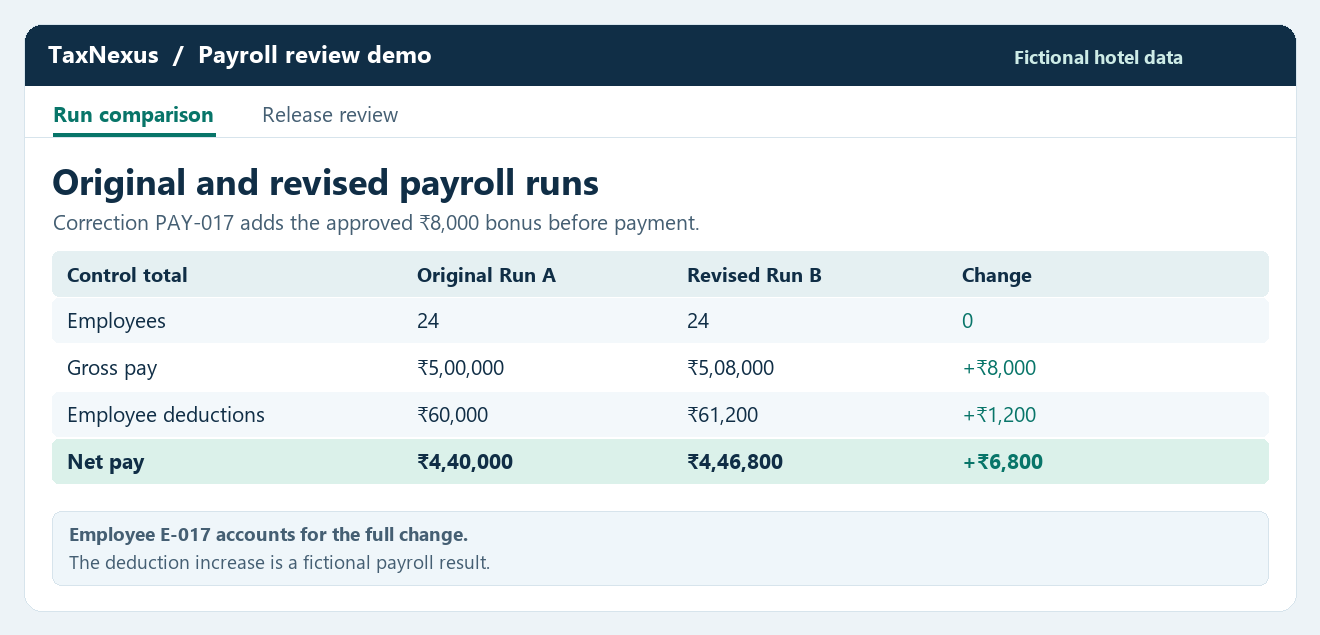
Compare by employee and earning or deduction code so an unexpected change can be traced back to the input. When reviewing payroll corrections, check for changes that cancel each other out in the overall total. In this example, the employee count stays at 24 and only E-017 should show a change. Check that the employee-level gross, deduction and net movements reconcile back to the run totals. If any additional change appears, hold the release until its source is explained and approved. Payroll Reconciliation process and journal examples.
4. Regenerate the bank file and salary journal
Prepare a release record for payroll corrections that lists the revised payroll run, bank filename, payment date, bank total and journal batch. If Treasury finds an older export in the upload queue, check its status before removing it. Record who confirmed the old file was withdrawn and who checked the replacement. Finance should hold the draft journal until its source run and posting period have been verified.
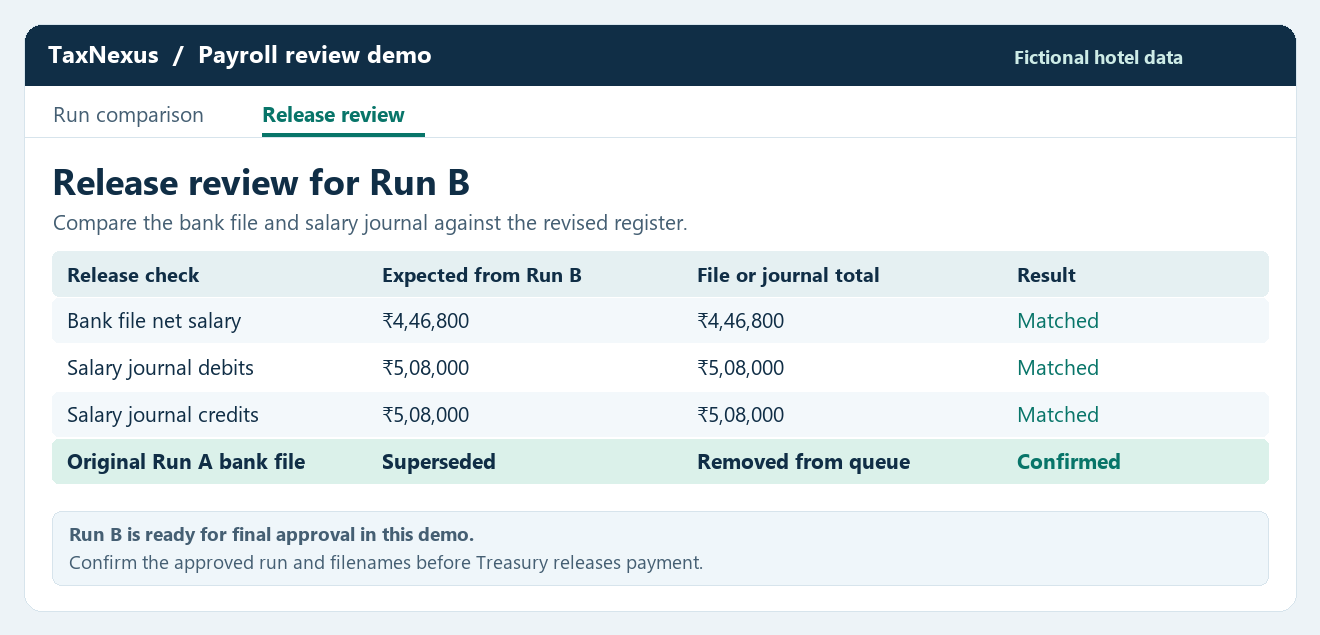
Generate both outputs from the approved Run B. Match the bank file to the approved payment population as well as the total. In this example all 24 employees are paid by bank and there are no held or separately paid amounts, so the bank file should total ₹4,46,800. If a real run includes holds, cash payments or split accounts, reconcile those differences separately and compare the bank file with the corresponding payable amount.
In the simplified employee portion of the journal, Run B debits salary expense by ₹5,08,000, credits employee deduction liabilities by ₹61,200 and credits net salary payable by ₹4,46,800. Both sides total ₹5,08,000. Employer costs and deductions that use other accounts need their own documented mapping. Check the posting period and journal reference. Remove the superseded bank file from the active release queue under the approved process so Treasury has only one version to transmit. Hotel Service Charge Reconciliation.
5. Use a sign-off checklist for payroll corrections
- Check the payroll period, original run reference and revised run reference.
- Match the changed earning to an approved input and the correct employee.
- Reconcile gross pay, employee deductions and net pay at employee and run level.
- Confirm the new bank file and journal match the approved rerun and mark earlier outputs as superseded.
- Record the independent review, approval date and the file references released to bank and finance.
Once payroll corrections are approved, give Treasury and Finance the revised run reference and the exact filenames or journal IDs. At month-end, retain the comparison with the final register and bank acknowledgement so the reviewer can trace how the payroll moved from the original run to the approved one. Hotel Month-End Close guide.
Oracle’s payroll documentation provides an example of how retry and rollback options depend on the status of a payroll process. Oracle payroll process documentation.