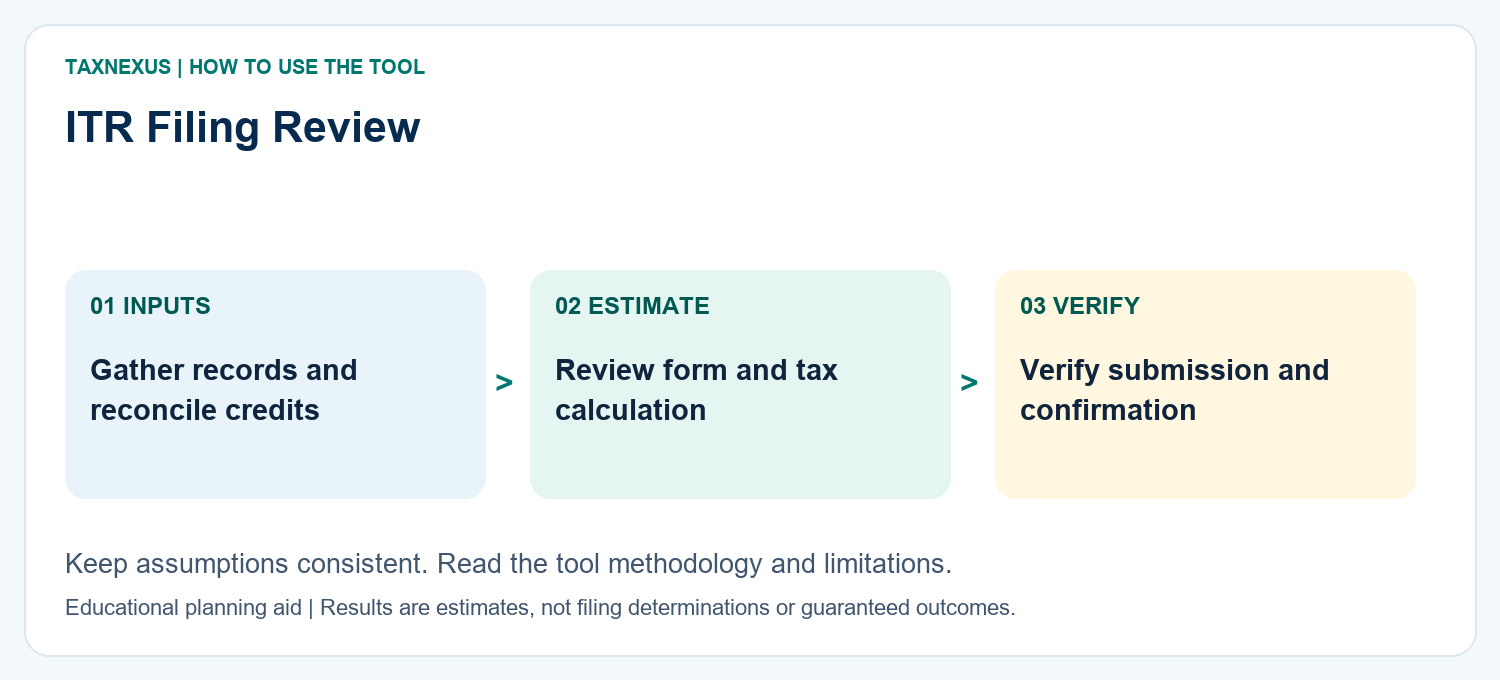
ITR filing starts with the correct year, complete records and the appropriate return form. Follow the 17-step AY 2026–27 walkthrough below and review the final return before submission and verification.
Updated for AY 2026–27: This guide explains the online ITR filing process for individuals on the Income Tax e-Filing portal. Tax rules and form eligibility can vary by income type, residential status and other facts, so verify your case before submission.
Filing your Income Tax Return (ITR) online is straightforward when your documents are ready and you select the correct return form. Follow the steps below for Assessment Year 2026–27, which relates to income earned during Financial Year 2025–26.
Documents to Keep Ready Before Filing ITR
- PAN and Aadhaar details
- Form 16 from employer, if salaried
- Form 26AS and Annual Information Statement (AIS)
- Bank statements and interest certificates
- Dividend details
- Capital gain statements for shares, mutual funds, ETFs or other investments, if applicable
- Home-loan interest certificate, rent details and other deduction proofs, where relevant
- Details of advance tax or self-assessment tax already paid
Which ITR Form Should You Choose?
If you are unsure whether ITR-1 or ITR-2 applies to you, see our ITR-1 vs ITR-2 comparison for AY 2026–27. You can also review the Old vs New Tax Regime guide, reconcile AIS vs Form 26AS, and visit the Income Tax Hub before completing the return.
| ITR Form | Broad Use |
|---|---|
| ITR-1 (Sahaj) | Eligible resident individuals with total income up to ₹50 lakh from permitted sources such as salary/pension, eligible house-property income, other sources, agricultural income up to ₹5,000 and eligible LTCG under section 112A up to ₹1.25 lakh, subject to exclusions. |
| ITR-2 | Individuals/HUFs not having income from profits and gains of business or profession and who are not eligible for ITR-1. |
| ITR-3 | Generally used where the individual/HUF has income from business or profession and is not eligible for ITR-4. |
| ITR-4 (Sugam) | Optional simplified return for eligible resident individuals/HUFs/firms using presumptive taxation under sections 44AD, 44ADA or 44AE, subject to conditions. |
Important: ITR-1 is not available in several situations, including certain short-term capital gains, specified foreign assets/income, unlisted equity holdings, total income above ₹50 lakh and other exclusions. Use the portal’s “Help me decide which ITR Form to file” option when unsure.
ITR Filing Step by Step for AY 2026–27
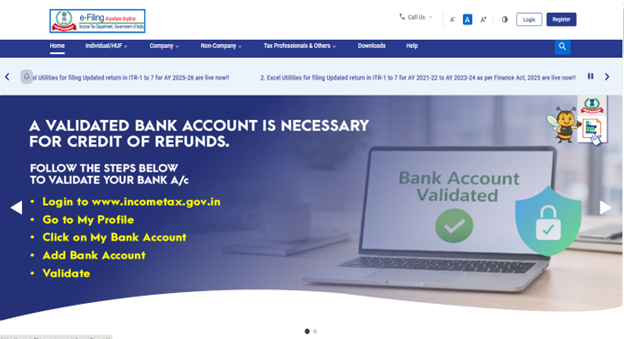
Step 1: Visit the Income Tax e-Filing Portal
Open the official Income Tax e-Filing website and log in using your PAN/User ID and password.
🔐
Step 2: Go to File Income Tax Return
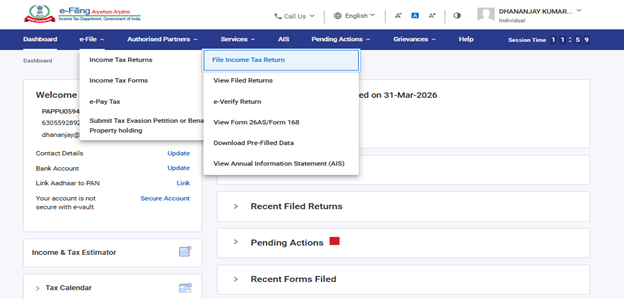
From the dashboard, go to e-File → Income Tax Returns → File Income Tax Return.
📂
Step 3: Select Assessment Year 2026–27
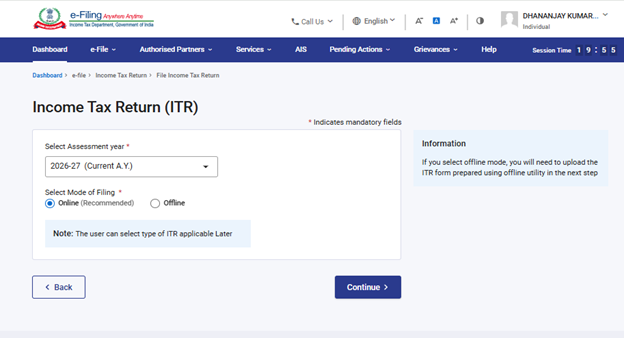
Select Assessment Year 2026–27, choose Online as the mode of filing, and continue.
📅
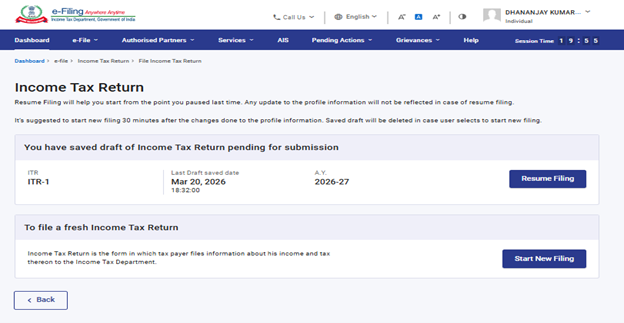
Step 4: Start a New Filing or Resume
If you already started the return earlier, choose Resume Filing. Otherwise select Start New Filing.
▶️
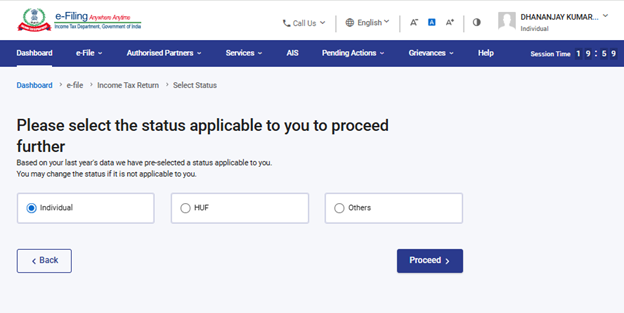
Step 5: Select Your Status
Choose the status applicable to you, such as Individual, and proceed.
👤
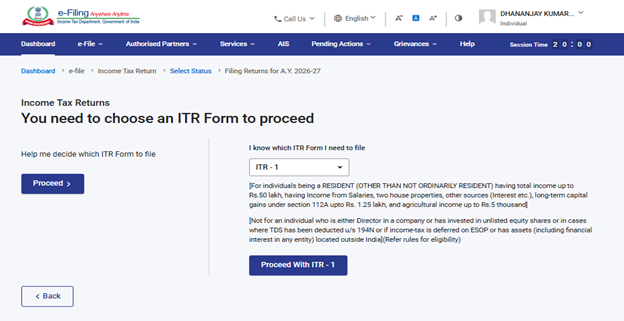
Step 6: Select the Correct ITR Form
Select the return form applicable to your income. If you are not sure, use the portal’s form-selection assistance rather than choosing a form only because it looks simpler.
🧾
Step 7: Review the Documents Required
The portal displays a list of information/documents you may need. Review it and click Let’s Get Started.
📋
Step 7: Check Requirements
Review documents and continue
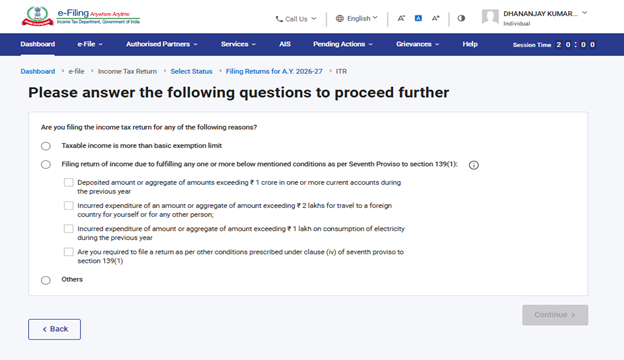
Step 8: Select the Reason for Filing
Select the appropriate reason for filing your return and continue.
❓
Step 9: Choose the Tax Regime Carefully
For AY 2026–27, the new tax regime is the default regime. In eligible non-business cases, you can choose the old regime in the return if it is more suitable for you. Certain exemptions and deductions differ between regimes.
⚖️
Step 9: Choose Tax Regime
Compare old vs new regime rules
Business/profession taxpayers: regime-selection rules can be different, including Form 10-IEA requirements in applicable cases. Check the relevant instructions before filing.
Step 10: Verify Personal Information and Bank Details
Review your PAN, Aadhaar-linked details, contact information, bank accounts and other pre-filled personal information. Correct any inaccurate details before proceeding.
🏦
Step 10: Verify Details
PAN, Aadhaar, contact and bank account
Step 11: Verify Salary and Other Income
Check the pre-filled salary and pension details against Form 16. Add or correct other income such as bank interest, fixed-deposit interest, dividend income, house-property income or other taxable receipts, as applicable.
💰
Step 11: Review Income
Salary, interest, dividend and other income
Step 12: Enter Capital Gains, if Applicable
If you sold shares, mutual funds, ETFs, property or other capital assets, report the transactions in the appropriate return and schedule. Do not omit transactions merely because tax was already deducted or the transaction appears in AIS.
📈
Step 12: Capital Gains
Report applicable asset-sale transactions
Step 13: Claim Eligible Deductions
Enter eligible deductions applicable to the tax regime you selected. Under the old regime, these may include eligible deductions under sections such as 80C, 80D and other provisions, subject to conditions and limits.
✅
Step 13: Claim Deductions
Enter only eligible deductions
Step 14: Cross-Check AIS and Form 26AS
Compare your return with AIS and Form 26AS. Check salary, interest, dividends, securities transactions, TDS/TCS and tax payments. Investigate material mismatches before filing.
🔎
Step 14: Check AIS / 26AS
Reconcile income, TDS and tax payments
Step 15: Review Tax Paid and Tax Payable
Confirm TDS/TCS and tax-payment credits. If additional tax is payable, pay the self-assessment tax and make sure the payment is correctly reflected before final submission.
💳
Step 15: Check Tax
Confirm TDS, refund or tax payable
Step 16: Preview the Return
Before submitting, review the complete return. Pay special attention to total income, deductions, tax regime, tax payable/refund, bank account details and schedules relevant to your case.
👀
Step 16: Preview Return
Review the complete ITR before submission
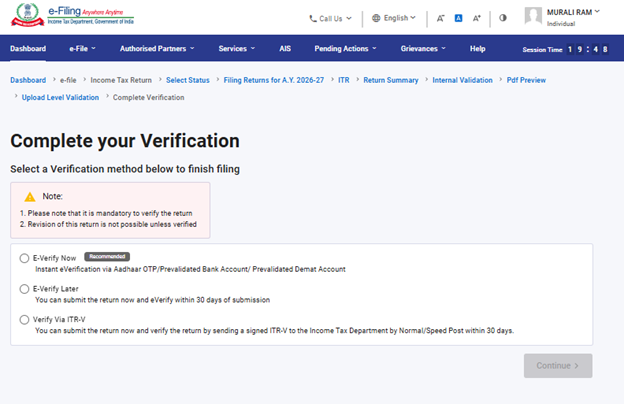
Step 17: Submit and e-Verify
Submit the return and complete e-Verification using an available method such as Aadhaar OTP, net banking or eligible EVC options. Filing should not be treated as complete until the return is properly verified.
🔐
Common Mistakes to Avoid
- Selecting the wrong ITR form
- Ignoring interest or dividend income
- Missing capital-gain transactions
- Claiming deductions not permitted under the selected tax regime
- Not reconciling AIS and Form 26AS
- Entering the wrong bank account for refund
- Submitting the return but forgetting to e-Verify it
Frequently Asked Questions
Is ITR-1 available for capital gains in AY 2026–27?
ITR-1 can accommodate eligible long-term capital gain under section 112A up to ₹1.25 lakh, subject to the other eligibility conditions. Short-term capital gains generally make ITR-1 unavailable.
Is the new tax regime the default?
Yes. The new tax regime is the default regime. Eligible taxpayers can opt for the old regime subject to the applicable rules.
What should I do if AIS and my records do not match?
Check the underlying transaction and supporting documents. Do not copy AIS blindly if you know an entry is incorrect, and do not omit genuine taxable income merely because it is absent from AIS.
Official References
- Income Tax e-Filing Portal
- Official ITR-1 Online User Manual
- Returns and Forms Applicable for Salaried Individuals – AY 2026–27
Disclaimer: This article is for general educational information and is not a substitute for professional tax advice. Income-tax rules, return forms and portal workflows can change. Check the latest instructions on the official Income Tax Department website before filing.